
Troubleshooting
Find your symptom below; each section explains what causes it and how to fix it. Exact notice texts are collected in the notices reference. If nothing here matches, file an issue with the details listed at the end.
“MetaEdit: Run” does nothing
Section titled ““MetaEdit: Run” does nothing”Cause: there is no active markdown file. If a PDF, canvas, or image is focused, or no file is open at all, the command has nothing to edit. By design it stays silent: the only trace is the message MetaEdit: no active markdown file. in the developer console. No popup appears.
Fix: click into a markdown note first, then run “MetaEdit: Run” again. To edit a note without opening it, right-click it in the file explorer and choose “Edit Meta” instead.
See commands and menus for every way to open the property picker.
“Edit Meta” is missing from the right-click menu
Section titled ““Edit Meta” is missing from the right-click menu”Cause: one of three things.
- The “UI Elements” setting is off. It gates all of MetaEdit’s context-menu items, including the two bulk edit items.
- The file is not a markdown note. “Edit Meta” only appears for
.mdfiles. - You right-clicked somewhere MetaEdit does not attach to. The item appears on file explorer entries, internal links in notes, and Calendar plugin days - not on tab headers or editor text selections.
Fix: open Settings, go to the MetaEdit tab, and turn on “UI Elements” (its description reads “Toggle UI elements: the ‘Edit Meta’ right-click menu option.”, and it also controls the bulk items). The change applies immediately, no restart needed.
See the settings reference for details.
A property is missing from the picker
Section titled “A property is missing from the picker”Cause: the property is being filtered or is not individually editable.
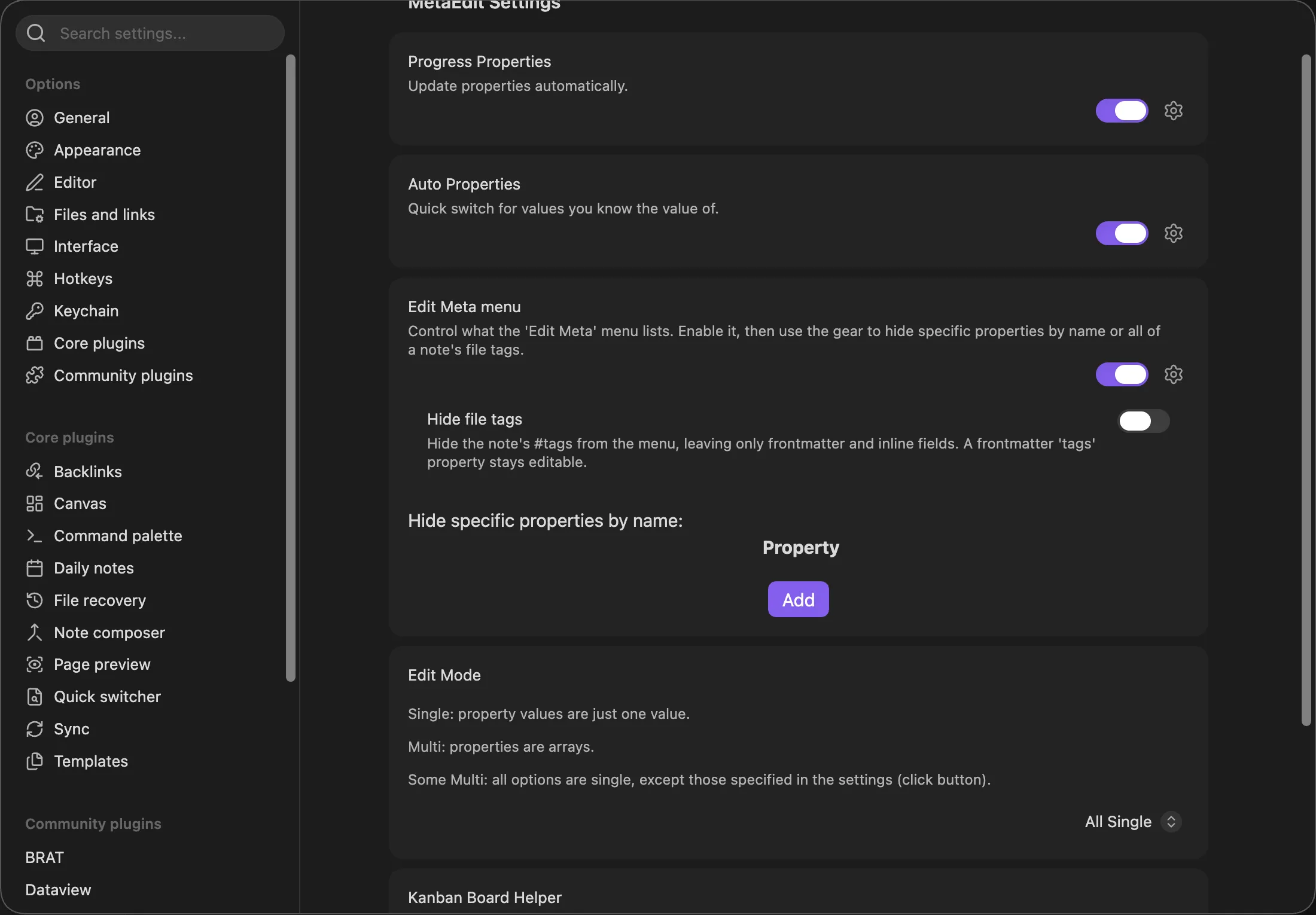
- “Edit Meta menu” filtering is enabled and the property’s key is on the hidden list. Matching is exact and case-sensitive.
- “Hide file tags” is on, which removes body
#tagrows from the picker. A frontmattertagsproperty stays visible and editable. - The value is a parent container - an object, or a list containing objects or lists. These are always hidden by design because they cannot be edited as one value; their nested leaves appear as individual child rows instead.
Fix: open Settings, go to the MetaEdit tab, and expand “Edit Meta menu”. Remove the key from the hidden list, or turn the section’s master toggle off - when it is off, nothing is filtered.
See what MetaEdit can (and can’t) edit for the container rule.
Progress Properties or the Kanban Board Helper never fire
Section titled “Progress Properties or the Kanban Board Helper never fire”Both automators share the same gates. Work through this checklist:
- The toggle is on. “Progress Properties” and “Kanban Board Helper” both default to off in the MetaEdit settings tab.
- The note has YAML frontmatter. A note with no frontmatter block is never processed, even if the property you track is an inline Dataview field.
- The property already exists in the note. Neither automator ever creates a property - both only update existing ones. Add
total: 0(or your key) yourself first. - The note is not an Excalidraw note. Notes whose frontmatter contains any key with “excalidraw” in it are skipped to avoid fighting Excalidraw’s auto-save.
- You waited out the debounce. Automators run 5 seconds after the last change, and the timer resets while you keep typing.
- The content actually changed. Re-saving identical content is skipped.
- The change happened inside Obsidian. Automators react to Obsidian’s file-modify event; edits made outside Obsidian’s vault API may not trigger them.
See Progress Properties and the Kanban Board Helper for setup walkthroughs.
The Kanban helper updates the wrong note, or nothing
Section titled “The Kanban helper updates the wrong note, or nothing”Cause: the helper is deliberately conservative about which link it syncs and which note it resolves to.
- Only the leading link counts. A card must be a top-level task line like
- [ ] [[Note]] ...; trailing links on the same line (Kanban date links such as@[[2026-07-01]],see [[ref]]mentions) and indented sub-items are ignored. - Heading-less cards have no lane. A card above the first heading is skipped because there is no lane name to write.
- Ambiguous basenames are refused. If several notes share the linked basename and Obsidian’s cache cannot resolve which one is meant, the helper skips that card rather than write to the wrong note.
- A renamed board file breaks the configuration. Boards are matched by file basename and the stored name does not follow a rename; the settings row then shows “FILE NOT FOUND” in its “Possible values” column. Re-add the board under its new name.
- The linked note must already have the property. If it is missing you get a notice per affected card:
MetaEdit: (ERROR) '<property>' not found in "<note>" (Kanban board '<board>').
Fix: structure cards as - [ ] [[Note]] under a heading, keep board file names stable, and add the configured property to each linked note. Details in the Kanban Board Helper guide.
“current value changed before update.”
Section titled ““current value changed before update.””The full notice reads MetaEdit could not update '<key>': current value changed before update.
Cause: the note changed underneath the open edit modal - sync ran, another plugin wrote to the file, or you edited the note while the modal was open. MetaEdit compares the value it read when the modal opened against the file at save time, and refuses to write rather than overwrite a change it never saw.
Fix: nothing is wrong - this is the safety net doing its job. Reopen the picker, which reads the current value, and make the edit again. See how MetaEdit writes to your notes.
A transform removed my property
Section titled “A transform removed my property”Cause: “Transform to YAML ⇄ Dataview” works as delete-then-re-add. If the re-add step fails after the delete succeeded, the property can end up removed, and MetaEdit tells you exactly that: MetaEdit could not transform '<key>': <reason>. It may have been removed - reopen the note to check.
Fix: reopen the note and check. If the property is gone, re-create it with “New YAML property” or “New Dataview field” from the picker. The failure reason in the notice (and the developer console) tells you what to fix before retrying - a reserved key name, for example, is refused for the Dataview-to-YAML direction up front.
See delete and transform properties.
Numbers or checkboxes are saved as strings
Section titled “Numbers or checkboxes are saved as strings”Cause: the edit ran in fallback mode. When Obsidian’s native property widgets are unavailable, MetaEdit shows a plain text input instead, preceded by a note reading “Obsidian native property widgets are not available.” or “Obsidian’s native <type> property widget is not available.” Everything committed through that text input is stored as a string.
Fix: on Obsidian 1.12.7 or newer (which MetaEdit 1.9.0 requires) the native widgets are normally always present, so fallback mode should be rare. If you see those notes regularly, update Obsidian. To repair an already-stringified value, edit the property again with the native widget, or fix its type in Obsidian’s Properties view.
See edit properties with native widgets.
Bulk edit reported failures
Section titled “Bulk edit reported failures”Cause: one or more notes could not be written - most commonly malformed frontmatter. A failing note never aborts the batch; the rest of the notes were still processed, and the summary notice appends “(see console for failed notes)”.
Fix: open the developer console (see below). The failures are logged once as MetaEdit bulk: failed to update <n> note(s) for "<key>": followed by each note’s path and error. Fix the listed notes, then run the same bulk edit again - re-running is idempotent, so already-correct notes are not rewritten (they count as “unchanged” under “Merge into a list” or “Overwrite existing values”, or “skipped” under “Skip notes that already have it”).
See bulk edit metadata across notes.
The “Edit Meta menu” toggle turned itself on after an update
Section titled “The “Edit Meta menu” toggle turned itself on after an update”Cause: a one-time settings migration. Older MetaEdit versions filtered your hidden-property list even while the feature toggle was off (a bug). Now that the toggle is honored, the upgrade turns the feature on once for users who had built up a hidden list, so their picker keeps looking the way it always did.
Fix: nothing is broken. If you want no filtering, turn the toggle off - the migration runs only once, so it will not flip back on. See the settings reference.
Open the developer console
Section titled “Open the developer console”Several MetaEdit messages go to the console only:
- Windows/Linux: press
Ctrl+Shift+I, then open the Console tab. - macOS: press
Cmd+Option+I, then open the Console tab. - Mobile: there is no built-in console. On Android you can attach Chrome’s remote debugger via
chrome://inspectwith USB debugging enabled; iOS does not expose one.
File a good issue
Section titled “File a good issue”If your problem is not covered here, open an issue on GitHub and include:
- Your Obsidian version (Settings, then “About”) and platform (desktop or mobile, OS).
- Your MetaEdit version (Settings, then “Community plugins”). The current release is 1.9.0 and requires Obsidian 1.12.7 or newer; the changelog explains how older Obsidian installs are served 1.8.4.
- Exact steps to reproduce, including how you triggered MetaEdit (“MetaEdit: Run”, “Edit Meta”, or a bulk item) and the relevant note content (frontmatter, inline fields, tags).
- The exact text of any notice, plus anything in the developer console.
- Relevant settings: Edit Mode, Auto Properties, “Edit Meta menu” filtering, and automator toggles.