
Auto Properties API
Three API methods work with Auto Properties: autoprop opens the same value prompt users see in the property picker, and getAutoProperties / setAutoProperties read and replace the configuration itself. This page covers their contracts and shows runnable Templater snippets; the guide covers the UI side.
All examples assume you have the API object:
const api = app.plugins.plugins["metaedit"].api;See the API overview for access patterns and the error model.
autoprop(propertyName)
Section titled “autoprop(propertyName)”autoprop(propertyName: string): Promise<string | string[] | null>Looks up an enabled Auto Property whose name exactly equals propertyName (matching is case-sensitive; the first match wins) and opens its value prompt, including the property’s description if one is set. It only prompts and returns the value - it never writes to a file. Pair it with update or createYamlProperty when you want the result written somewhere.
| Return value | When |
|---|---|
string |
The property’s type resolves to Single |
string[] |
The property’s type resolves to Multi |
null |
Auto Properties are disabled, no Auto Property with that name exists, or the user cancels the prompt |
Whether the prompt is single- or multi-select follows the property’s configured type: an explicit Single or Multi is authoritative. When the property has no type (configurations saved before types existed), it inherits the global Edit Mode: All Multi makes it multi-select, and Some Multi makes it multi-select when the property is listed there.
The prompt itself is interactive. If the user types a value that is not in the choice list, they can use it once or save it as a new choice, which persists into the Auto Property’s configuration.
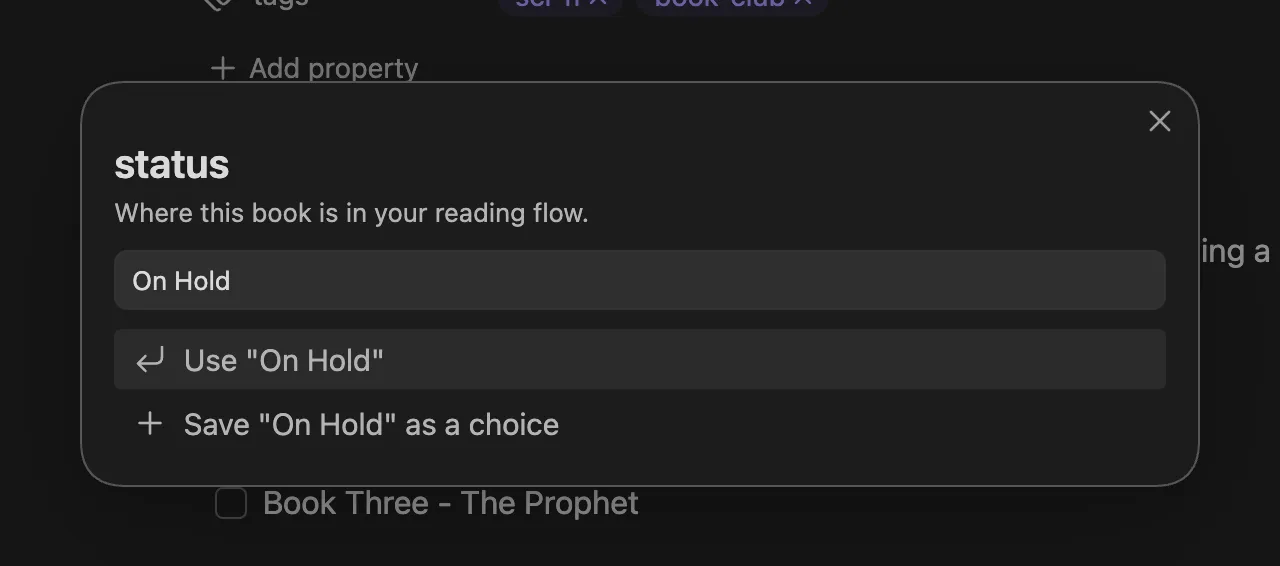
Because it opens a modal, autoprop needs a user at the keyboard. Do not call it from background jobs or event handlers that run without user interaction.
getAutoProperties()
Section titled “getAutoProperties()”getAutoProperties(): AutoProperty[]Returns the configured Auto Properties. This method is synchronous - no await needed. Each entry has this shape:
{ name: string, // exact property name the prompt matches on choices: string[], // the selectable values description?: string, // shown in the value prompt, only present when set type?: "Single" | "Multi" // only present when set; absent inherits Edit Mode}The result is a defensive copy with the choices arrays cloned, so mutating it changes nothing in MetaEdit’s settings. Use setAutoProperties to persist changes. The list is returned even while the Auto Properties feature toggle is off.
setAutoProperties(autoProperties)
Section titled “setAutoProperties(autoProperties)”setAutoProperties(autoProperties: AutoProperty[]): Promise<void>Replaces the entire Auto Properties list and saves settings. This is a full-list replace, not a merge: always start from getAutoProperties() and modify that copy, or you will silently drop every entry you did not include.
Input is validated up front, and the promise rejects with a TypeError naming the offending index when any rule fails:
- the argument must be an array of objects
- each entry must have a string
name - each entry’s
choicesmust be an array of strings description, when present, must be a stringtype, when present, must be"Single"or"Multi"
For example, passing a non-array rejects with TypeError: Auto Properties must be an array.
A few behaviors worth knowing:
- The input is deep-copied, so mutating your array after the call does not leak into settings. Keys other than
name,choices,description, andtypeare silently discarded. - Saves go through MetaEdit’s serialized settings write queue, so a
setAutoPropertiescall cannot race the settings tab or a choice the user saves from a prompt. - It does not flip the Auto Properties feature toggle - it only replaces the list.
Examples
Section titled “Examples”Add a choice to an existing property (Templater)
Section titled “Add a choice to an existing property (Templater)”This snippet reads the current configuration, appends a new choice to the status property, and saves the list back. It is safe to run repeatedly - the guard skips the write when the choice already exists.
<%*const api = app.plugins.plugins["metaedit"].api;
const autoProps = api.getAutoProperties();const status = autoProps.find((p) => p.name === "status");
if (status && !status.choices.includes("On Hold")) {    status.choices.push("On Hold");    await api.setAutoProperties(autoProps);}_%>
This works because getAutoProperties() hands you a copy you can edit freely before passing the whole list back to setAutoProperties.
Prompt for two frontmatter fields (Templater)
Section titled “Prompt for two frontmatter fields (Templater)”A template that fills two frontmatter properties from Auto Property prompts as the note is created. The ?? "" fallbacks keep cancelled prompts from writing a literal null, and the [ ... ] wrapper turns the joined Multi result into a real YAML list:
<%*const {autoprop} = this.app.plugins.plugins["metaedit"].api;_%>---status: <% (await autoprop("status")) ?? "" %>genres: [<% (await autoprop("genres"))?.join(", ") ?? "" %>]---
# <% tp.file.title %>
For a complete task template built on autoprop, see runnable examples. For more template patterns, see the Templater metadata prompts cookbook.