
How metadata works in Obsidian
Obsidian notes can carry metadata in three different places, and each place behaves differently. This page explains all three, plugin-agnostically, so the rest of these docs makes sense. If you already know the difference between a frontmatter property, an inline key:: value field, and a #tag, skip ahead to what MetaEdit can (and can’t) edit.
One note, three homes
Section titled “One note, three homes”Here is a single note that uses all three:
---status: readingrating: 8started: 2026-06-14tags:  - sci-fi  - book-club---
owner:: Christian
Borrowed copy - return it by the weekend (due:: 2026-07-15).
Reading with the #book-club crowd this month.- Everything between the two
---lines is YAML frontmatter: the propertiesstatus,rating,started, andtags. owner:: Christianand(due:: 2026-07-15)are inline Dataview fields: plain text in the note body that follows akey:: valueconvention.#book-clubis a body tag, and thetagsfrontmatter property holds frontmatter tags. Both count as tags, but they live in different places.
YAML frontmatter properties
Section titled “YAML frontmatter properties”Frontmatter is a YAML block that must sit at the very top of the note, fenced by --- lines. Obsidian parses it and renders it as the Properties panel above your note, where each key becomes an editable field.
Every property has a type. Obsidian’s built-in types are Text, List, Number, Checkbox, Date, and Date & time. Crucially, Obsidian remembers the type per property name, vault-wide: once you set rating to Number in one note, every rating property in every note is treated as a Number and gets the number widget. In the example above, status is Text, rating is Number, started is Date, and tags is a List.
A few property names are reserved and get special handling from Obsidian itself: tags (the note’s tags), aliases (alternative names for linking), and cssclasses (styling hooks). Of these, tags matters most for metadata editing - see tags below.
Frontmatter is the right home for structured facts about the note as a whole: a status, a rating, dates, links to related notes.
Inline Dataview fields
Section titled “Inline Dataview fields”An inline field is nothing more than a text convention: a key, two colons, and a value. It comes in three shapes:
status:: reading
Borrowed copy - return it soon [due:: 2026-07-15].
The lender (owner:: Christian) wants it back.- A full-line field takes the whole line:
status:: reading. - A bracketed field in
[key:: value]or(key:: value)form can sit in the middle of a sentence, and several can share a line.
Two things make inline fields different from frontmatter:
- They are plain text. No plugin is needed to write or read them. The Dataview plugin popularized the syntax and is needed only if you want to query these fields; the fields themselves are just characters in your note.
- They live in the body and can repeat. The same field name can appear many times, anywhere in the note, right next to the prose it describes.
Inline fields are the right home for facts that belong in context: a due date inside the sentence that mentions the loan, a rating next to the paragraph that justifies it.
Tags exist in two physically different places:
- Body tags are
#tagtokens in the note text, like#book-clubor the nested#book-club/june. - Frontmatter tags are entries in the reserved
tagsproperty, stored without the#.
For search, queries, and the Tag pane, both count equally as “the note’s tags”. But they are different things on disk: a body tag is a token inside your prose, while a frontmatter tag is one entry in a YAML list. That difference matters as soon as you want to edit a tag - renaming a body tag means rewriting one exact spot in the text, while changing frontmatter tags means editing a list value. MetaEdit treats the two accordingly; see edit tags.
Comparison
Section titled “Comparison”| Home | Where it lives | Typed values? | Multiple instances? | Rendered UI | Best for |
|---|---|---|---|---|---|
| YAML frontmatter property | The --- block at the very top |
Yes: Text, List, Number, Checkbox, Date, Date & time, remembered per name vault-wide | One value per key (a List holds many values) | The Properties panel | Structured facts about the whole note |
| Inline Dataview field | Anywhere in the body: key:: value, [key:: value], (key:: value) |
No: plain text until a plugin interprets it | Yes: the same field can appear many times | Plain text (Dataview renders it when installed) | Facts that belong next to the prose they describe |
| Tag | In the body as #tag, or in the frontmatter tags property |
No: a tag is a name, optionally nested with / |
Yes: any number, including repeats of the same tag | Highlighted tag pills; the Tag pane | Cross-note grouping and filtering |
How MetaEdit fits
Section titled “How MetaEdit fits”MetaEdit edits all three homes from one place. Run “MetaEdit: Run” from the command palette, or right-click a note and choose “Edit Meta”, and you get the property picker: a searchable list of every editable piece of metadata in the note.
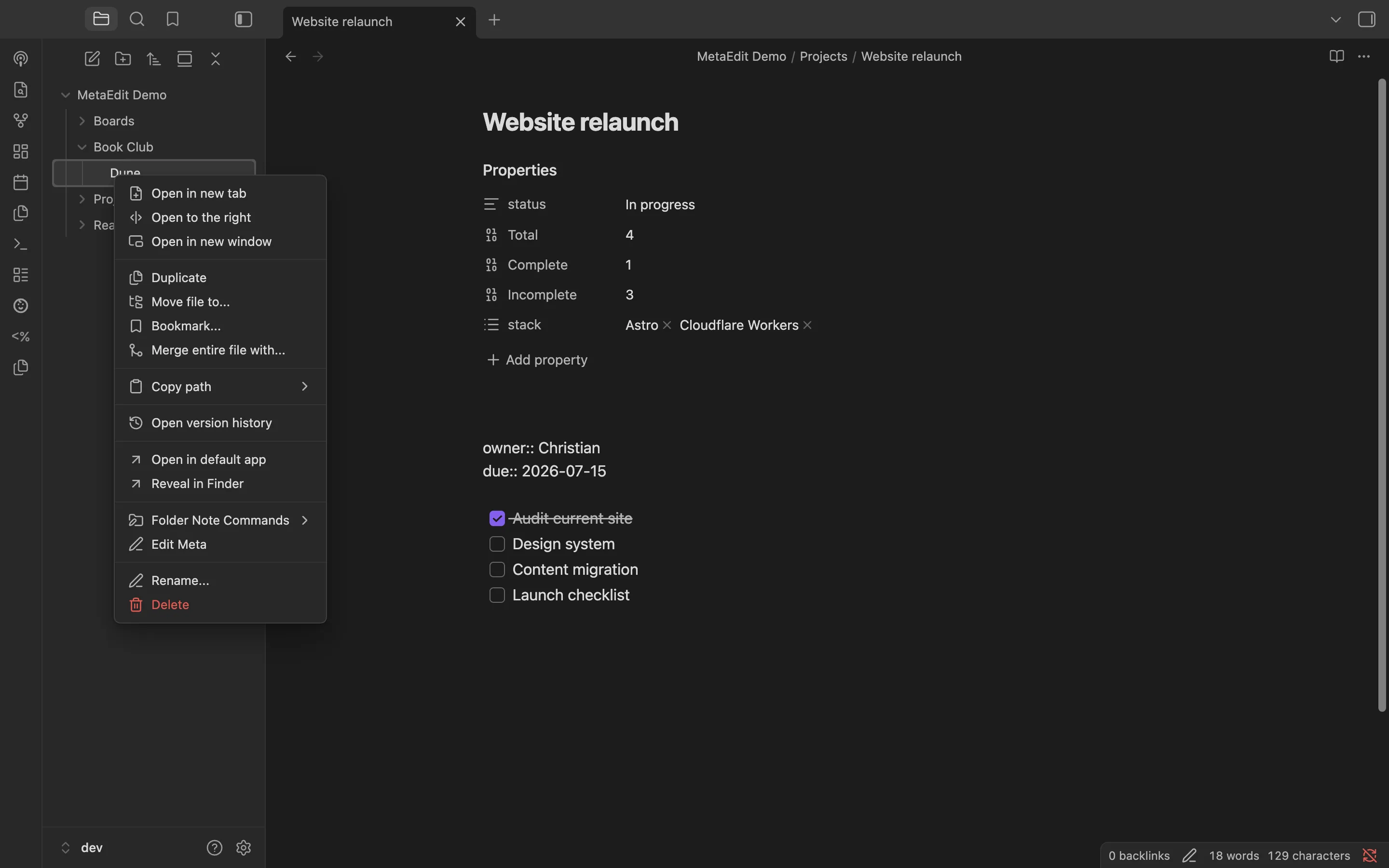
Each home gets the right tool: YAML properties open Obsidian’s own native widgets (the same date picker and list chips the Properties panel uses), while inline fields and body tags are edited by precise in-place text edits that leave the rest of the line untouched. MetaEdit 1.9.0 requires Obsidian 1.12.7 or newer and works on desktop and mobile.
Continue with:
- What MetaEdit can (and can’t) edit - how a note maps to picker rows.
- How MetaEdit writes to your notes - the guarantees behind every write.
- Quick start - make your first edit.