
Bulk metadata migrations and cleanups
MetaEdit’s bulk edit writes one YAML property across many notes in a single pass, with a conflict policy that decides what happens to notes that already have the key. This page turns the three policies into three migration recipes you can reuse: an additive stamp, a list merge, and a value standardization with a safety net.
If you have not used bulk edit before, the bulk edit guide covers the full flow. The short version: right-click a folder and choose “Bulk edit metadata in this folder (and subfolders)”, or select several notes and choose “Bulk edit metadata in selected notes”. There is no command palette entry - bulk edit is context-menu only, and both items live behind the “UI Elements” toggle in settings (on by default).

Pick a policy
Section titled “Pick a policy”When some notes in scope already define the property, MetaEdit shows a chooser with three policies:
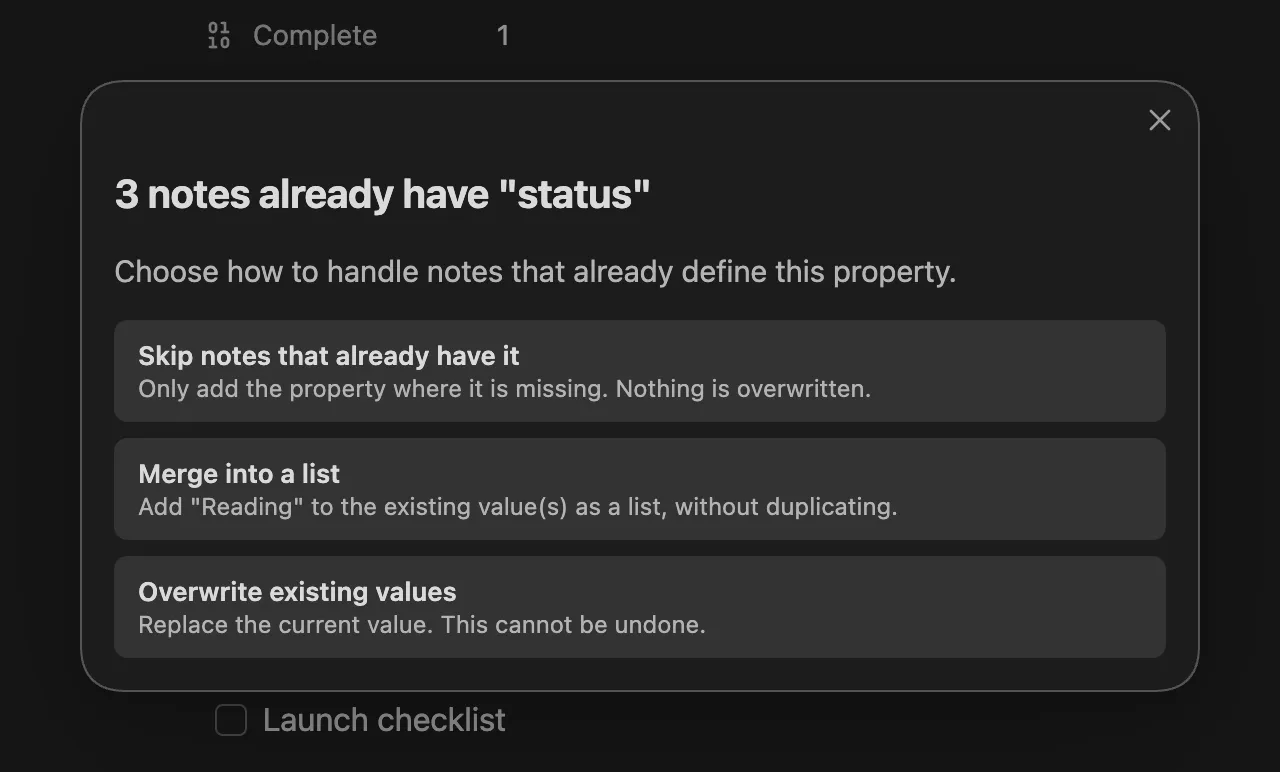
| Policy | What it does | Use it for |
|---|---|---|
| “Skip notes that already have it” | “Only add the property where it is missing. Nothing is overwritten.” | Additive stamps (recipe 1) |
| “Merge into a list” | Add the value to the existing value(s) as a list, without duplicating | Growing shared lists (recipe 2) |
| “Overwrite existing values” | “Replace the current value. This cannot be undone.” | Standardizing values (recipe 3) |
If no note in scope has the key yet, the chooser is skipped and everything is an add. Pressing Escape in the chooser aborts the whole operation - nothing is written.
Two things bulk edit always does, regardless of policy: it writes YAML frontmatter only (never inline key:: value fields), and it honors your Edit Mode setting, so a key configured as multi-value is written as a one-element list just like a single-note add. It ignores Auto Properties and Edit Meta menu filtering entirely, and it is not undoable with Ctrl+Z.
Recipe 1: stamp a type on a folder
Section titled “Recipe 1: stamp a type on a folder”Goal: every note in Library/ gets type: book, without touching notes that already declare a type.
- Right-click the
Libraryfolder and choose “Bulk edit metadata in this folder (and subfolders)”. The prompt is scoped to every markdown note in the folder tree. - Enter
typeas the property name, thenbookas the value. - If the policy chooser appears, pick “Skip notes that already have it”.
This is the safest bulk operation: purely additive, and idempotent. Notes that already carry a type come back as “skipped” and are not rewritten on disk - skip never compares values, so an existing type: article is left alone too. That means you can re-run the same stamp any time - for example after importing a new batch of notes - and only the newcomers change. A typical summary Notice:
MetaEdit bulk "type": 12 added, 3 skipped across 15 notes.Recipe 2: merge a topic into existing lists
Section titled “Recipe 2: merge a topic into existing lists”Goal: a set of notes scattered across folders all gain productivity in their topics list, whether they currently have no topics, a scalar topics: focus, or a full list.
- In the file explorer, Ctrl/Cmd-click (or Shift-click) the notes to include. Folders in the selection are expanded recursively.
- Right-click the selection and choose “Bulk edit metadata in selected notes”.
- Enter
topics, thenproductivity. - Pick “Merge into a list”.
Merge semantics worth knowing:
- Every note ends list-shaped. A missing
topicsis created astopics: [productivity]; a scalar is converted to a list before appending. - Values are deduplicated: a note that already lists
productivityis left alone and counted as “unchanged”. Dedupe treats the number5and the string"5"as equal. - A property whose current value is a map (nested object) is left untouched and counted as “skipped” - merge refuses to clobber structured data.
Like recipe 1, a merge run is idempotent: re-running it reports “unchanged” across the board.
Recipe 3: standardize a value
Section titled “Recipe 3: standardize a value”Goal: notes with status: WIP should say status: In Progress instead.
Overwrite replaces the value on every note in scope that has the property, and adds it where missing - it does not know or care what the old value was. So the crucial move is scoping: select exactly the notes that should change, not the whole folder.
- Find the affected notes. Obsidian’s search handles this directly: search
[status:WIP]to list every note whosestatusproperty isWIP. A Dataview table works too. - In the file explorer, multi-select exactly those notes, right-click, and choose “Bulk edit metadata in selected notes”.
- Enter
status, thenIn Progress. - Pick “Overwrite existing values”.
- A confirmation modal appears, framed against the full selection size:
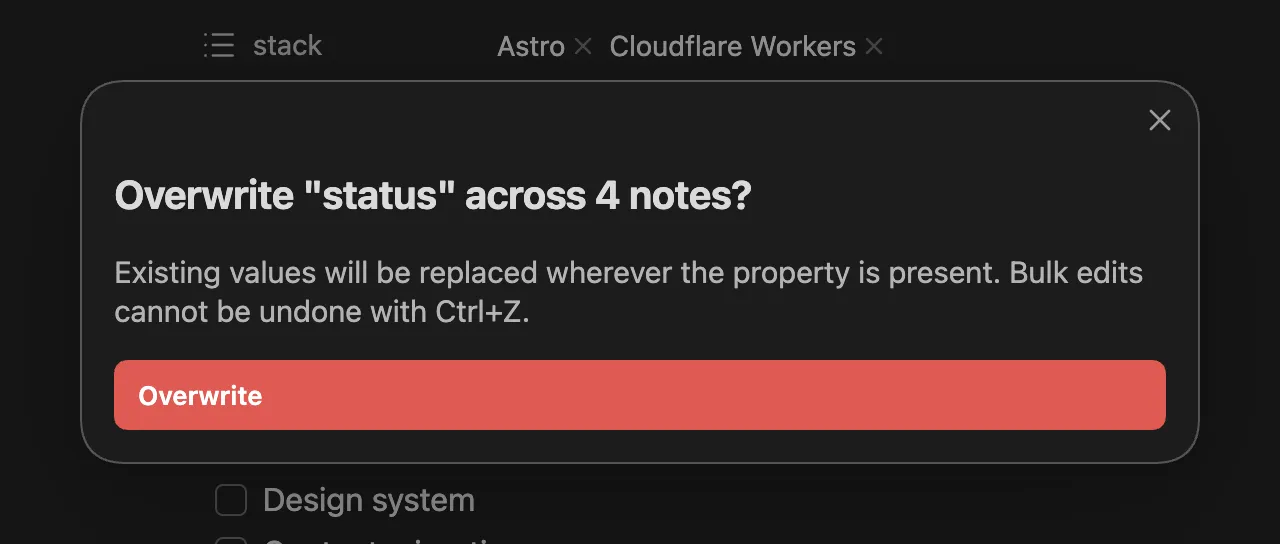
Click the red “Overwrite” button to proceed. Anything else - Escape, clicking away - aborts the entire operation.
Overwrite is still idempotent in the harmless direction: notes whose value already equals the new one count as “unchanged” and are not rewritten.
Bonus: inline fields need Transform, not bulk
Section titled “Bonus: inline fields need Transform, not bulk”Bulk edit only writes YAML frontmatter. If some notes carry the property as an inline Dataview field (status:: WIP in the body), bulk edit does not see it - it would add a separate YAML status next to the inline one, leaving the note with two properties of the same name.
To migrate inline fields to YAML, use the per-row “Transform to YAML ⇄ Dataview” action instead: open the property picker on the note (“MetaEdit: Run” or right-click, “Edit Meta”), hover the property’s row, and click the transform icon. This is a note-by-note operation - there is no bulk transform - so treat inline-to-YAML migration as a gradual cleanup. Details in delete and transform properties.
Read the summary, then the console
Section titled “Read the summary, then the console”Every run ends with one Notice that stays up for 10 seconds, listing only the non-zero outcome buckets:
MetaEdit bulk "status": 3 overwritten, 1 unchanged across 4 notes.The buckets mean: “added” (key was missing and written), “merged” (appended into a list), “overwritten” (replaced), “skipped” (left alone by policy), “unchanged” (already had the value, no write), “failed” (write error). If nothing changed at all, the detail reads “no changes”.
A failure on one note never aborts the batch. When any note fails, the Notice appends “(see console for failed notes)”; open the developer console (Ctrl+Shift+I, or ⌘+Option+I on macOS) to find a warning like:
MetaEdit bulk: failed to update 2 note(s) for "status":followed by the failing paths and error messages. Fix the notes (malformed frontmatter is the usual culprit) and re-run - the notes that already succeeded come back as “unchanged”.