
Prompt for metadata in Templater templates
Templater templates can pause and ask for metadata using the same value prompts MetaEdit shows in its own flows. This recipe covers calling autoprop() from a template, handling null results, and the two ways to get the answer into the note: printing an inline Dataview field or writing typed frontmatter with addOrUpdateProperty().
Prerequisites
Section titled “Prerequisites”- The Templater community plugin.
- MetaEdit 1.9.0 or later (Obsidian 1.12.7+, desktop or mobile) with the “Auto Properties” toggle on and the properties you want to prompt for defined in settings. This recipe uses the
status(Single) andgenres(Multi) Auto Properties from Build a reading tracker.
How autoprop() behaves
Section titled “How autoprop() behaves”autoprop(propertyName) opens the Auto Property value prompt for the named property and resolves with the user’s choice:
- a
stringfor a “Single” Auto Property - a
string[]for a “Multi” Auto Property nullwhen nothing could be prompted, or the prompt was cancelled
It only prompts - it never writes to any file. Writing is your template’s job, which is exactly what makes it composable. Matching is exact and case-sensitive: autoprop("status") finds an Auto Property named status, not Status.
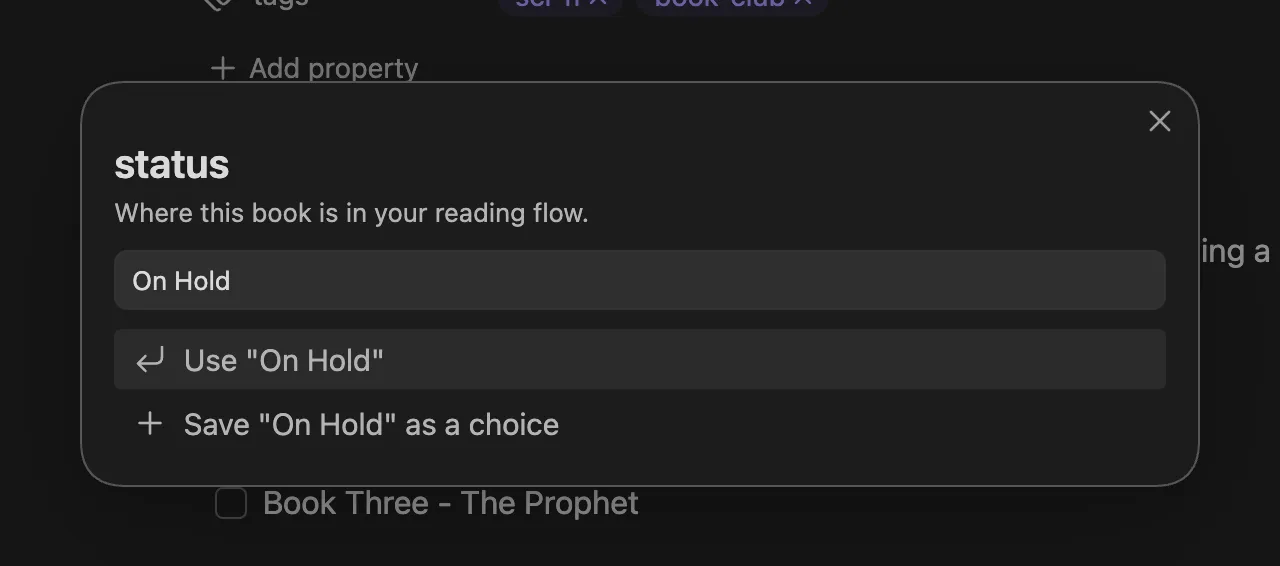
Call it from a Templater execution block:
<%*const {autoprop} = this.app.plugins.plugins["metaedit"].api;const status = await autoprop("status"); // "Reading", or null%>Variables declared in a <%* %> block stay in scope for the rest of the template, including later <% %> interpolations.
Handle null every time
Section titled “Handle null every time”autoprop() resolves null in exactly three cases:
- The “Auto Properties” toggle is off in MetaEdit’s settings.
- No enabled Auto Property has that exact, case-sensitive name.
- The user cancelled the prompt (Esc, or clicking outside).
So treat null as a normal outcome, not an error. The two useful patterns:
// Fall back to a default:const status = (await autoprop("status")) ?? "To Read";
// Or skip the write entirely:const genres = await autoprop("genres");if (genres !== null) { // write it}Two ways to write the answer
Section titled “Two ways to write the answer”Print an inline Dataview field
Section titled “Print an inline Dataview field”The simplest option: put the key:: value line in the template body and interpolate the result. Join Multi results yourself - the array is yours to format (when MetaEdit writes an inline field itself, it joins with ", ", so match that):
Status:: <% (await autoprop("status")) ?? "" %>Genres:: <% (await autoprop("genres"))?.join(", ") ?? "" %>This is the pattern the classic “New Task” template uses; see API examples. It is a good fit when the values belong in the note body and downstream queries read inline fields, as in the task dashboard.
Write typed frontmatter with addOrUpdateProperty()
Section titled “Write typed frontmatter with addOrUpdateProperty()”addOrUpdateProperty(propertyName, propertyValue, file) creates the frontmatter key when the note has no such property, and updates the existing one otherwise (an existing inline field or tag with that name wins over creating YAML). The value is written verbatim, so types survive: a string[] from a Multi prompt becomes a real YAML list, numbers stay numbers. Details in Properties API.
Timing matters, though. Templater writes the rendered template into the note after your code runs, so frontmatter written mid-render can be overwritten by Templater’s own output. Wrap the writes in tp.hooks.on_all_templates_executed, which fires once Templater has finished writing the file:
tp.hooks.on_all_templates_executed(async () => { const file = tp.file.find_tfile(tp.file.path(true)); await api.addOrUpdateProperty("status", status, file);});The file argument takes a TFile or a vault-relative path. An unresolvable file is a silent no-op - no error, no write - so prefer passing the TFile from tp.file.find_tfile.
Choosing between them
Section titled “Choosing between them”| You want | Use |
|---|---|
| Values visible in the note body, queried as inline fields | Print key:: value lines |
| Real typed frontmatter: lists, numbers, dates | addOrUpdateProperty() |
| Another instance of a field, without touching existing ones | appendDataviewField() |
The complete New Book template
Section titled “The complete New Book template”This template combines both approaches: typed frontmatter for the reading tracker schema, and one inline field printed straight into the body.
<%*const api = this.app.plugins.plugins["metaedit"].api;
// Prompt for everything up front. autoprop only prompts - it never writes.const status = (await api.autoprop("status")) ?? "To Read";const genres = (await api.autoprop("genres")) ?? [];const author = (await tp.system.prompt("Author")) ?? "";
// Write the typed frontmatter after Templater finishes writing the note.tp.hooks.on_all_templates_executed(async () => {  const file = tp.file.find_tfile(tp.file.path(true));  await api.addOrUpdateProperty("author", author, file);  await api.addOrUpdateProperty("status", status, file);  await api.addOrUpdateProperty("genres", genres, file);  if (status === "Reading") {    await api.addOrUpdateProperty("started", tp.date.now("YYYY-MM-DD"), file);  }});-%># <% tp.file.title %>
Recommended by:: <% (await tp.system.prompt("Recommended by")) ?? "" %>
## Notes
- [ ] First impressions
How it holds together:
- The prompts fire in order as the note is created: the
statuspicker, thegenresmulti-select, then two plain Templater text prompts. - The
??defaults mean a cancelled prompt, or the “Auto Properties” toggle being off, still produces a valid note instead ofnulltext or a rejected write. genresreachesaddOrUpdateProperty()as an array, so it lands in frontmatter as a real YAML list.startedis only written when the book begins asReading.addOrUpdateProperty()creates missing keys, so nothing needs seeding.- The frontmatter writes run inside
on_all_templates_executed, after Templater’s own write; the “Recommended by” line is ordinary template output, so it needs no hook.
Creating a note from the template yields:
---author: Frank Herbertstatus: Readinggenres:  - Sci-fi  - Classicsstarted: 2026-07-01---# Dune
Recommended by:: Alice
## Notes
- [ ] First impressions
There is no rating yet - add it when you finish the book via “New YAML property”, where it adopts the Number type automatically (Create properties).
Related pages
Section titled “Related pages”- Auto Properties guide - defining choice lists, Single vs Multi, learn-as-you-go values.
- Auto Properties API -
autoprop(),getAutoProperties(), andsetAutoProperties()in full. - Properties API -
update(),addOrUpdateProperty(),appendDataviewField(), and friends. - API examples - more copy-paste starting points, including the New Task template.