
Bulk edit metadata across notes
Bulk edit writes one YAML frontmatter property across many notes in a single pass. You pick the notes with a right-click, name the property and value, and choose a policy for notes that already define the property.

Start a bulk edit
Section titled “Start a bulk edit”Bulk edit lives in the file explorer’s context menu. There is no command palette entry for it.
| Where you right-click | Menu item | Notes in scope |
|---|---|---|
| A folder | “Bulk edit metadata in this folder (and subfolders)” | Every .md file in the folder, at any depth |
| A multi-selection of files and folders | “Bulk edit metadata in selected notes” | Every selected .md file, plus every .md file inside selected folders |
A few things to know about the menu items:
- They only appear when the folder or selection contains at least one Markdown file somewhere in scope. Non-Markdown files are ignored.
- A note reached two ways (selected directly and inside a selected folder) is edited once.
- Both items are gated by the “UI Elements” toggle in MetaEdit’s settings (on by default). Its description only mentions the “Edit Meta” option, but it gates the bulk items too.
Name the property and value
Section titled “Name the property and value”- A prompt opens, titled with the scope, for example “Property to add/update across 12 notes in Books (and subfolders)”. For a folder right-click the scope label is always the folder name plus “(and subfolders)”, even when only one note is in scope. For a multi-selection it is the file’s name including its extension (like “Dune review.md”) when exactly one note is in scope, otherwise “5 selected items”, counting the selected files and folders. Type the property name and press Enter.
- A second prompt titled ‘Value for “status”’ asks for the value. Type it and press Enter. The value is written exactly as typed; it is not trimmed.
Press Escape at any prompt to abort. Nothing is written until the whole flow completes.
The reserved names __proto__, constructor, and prototype are refused on every MetaEdit write path. Entering one here aborts immediately with the notice: MetaEdit: "__proto__" is a reserved property name and can't be used.
Choose a conflict policy
Section titled “Choose a conflict policy”MetaEdit scans the frontmatter of every note in scope. If none of them define the property, it is added everywhere without further questions. If some already have it, a modal opens - for example, ‘3 notes already have “status”’ - and asks: “Choose how to handle notes that already define this property.”
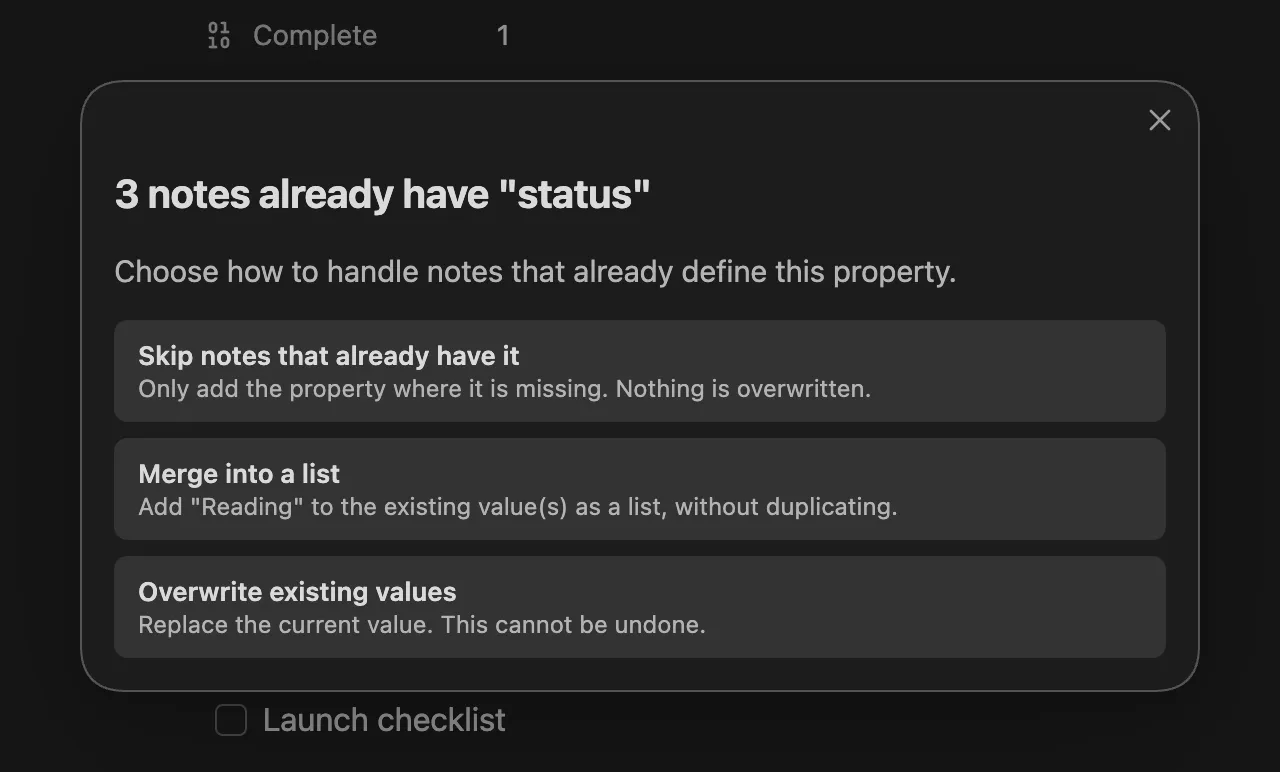
| Policy | Description in the modal | Effect on a note that has the property |
|---|---|---|
| “Skip notes that already have it” | “Only add the property where it is missing. Nothing is overwritten.” | Left untouched; the property is only added where missing |
| “Merge into a list” | ‘Add “Reading” to the existing value(s) as a list, without duplicating.’ (quotes your value) | The existing value becomes a list with your value appended, unless it is already present |
| “Overwrite existing values” | “Replace the current value. This cannot be undone.” | The current value is replaced with yours |
Merge has a few deliberate rules:
- Duplicates are dropped. Equality ignores the string/number distinction, so
5and"5"count as the same value. - Notes that were missing the property get a one-element list, so every note in a merge run ends up list-shaped.
- A property whose current value is a YAML map (nested keys) is left alone and counted as skipped, rather than clobbering structured data.
Dismissing the modal with Escape or a click outside aborts the entire operation.
Confirm an overwrite
Section titled “Confirm an overwrite”Choosing “Overwrite existing values” opens one more modal. Its title counts the full scope, not just the conflicting notes, so the stated blast radius never understates what could be replaced.
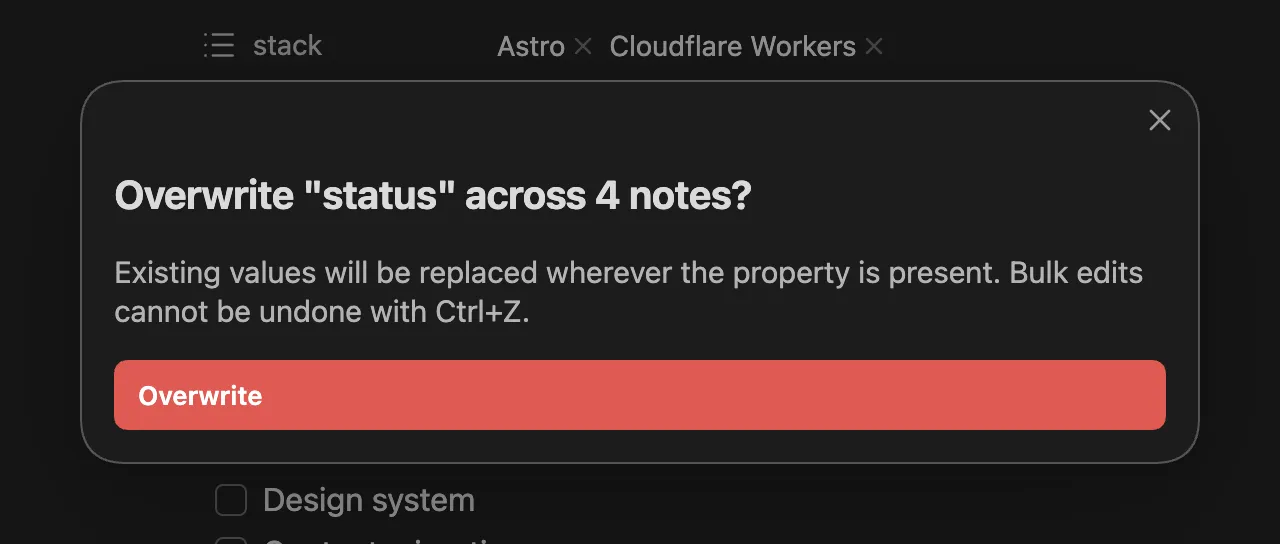
The warning reads: “Existing values will be replaced wherever the property is present. Bulk edits cannot be undone with Ctrl+Z.” Only clicking the red “Overwrite” button proceeds; Escape or clicking away aborts everything.
Read the summary
Section titled “Read the summary”When the run finishes, a single notice shows for 10 seconds:
MetaEdit bulk "status": 3 added, 2 skipped across 12 notes.Only non-zero outcomes are listed, always in this order:
| Outcome | Meaning |
|---|---|
| added | The property was missing and was written |
| merged | Your value was appended into a list |
| overwritten | The existing value was replaced |
| skipped | Left alone by policy (skip policy, or merge into a map-valued property) |
| unchanged | The value was already equal; nothing was rewritten |
| failed | The write errored on this note |
If every count is zero, the detail reads “no changes”. When any note fails, the notice appends “(see console for failed notes)” and the failing paths with their error messages are logged once to the developer console (Ctrl+Shift+I, or ⌘+Option+I on macOS). A failure on one note never aborts the batch; the remaining notes are still processed.
Boundaries and guarantees
Section titled “Boundaries and guarantees”- YAML frontmatter only. Bulk edit never touches inline Dataview fields (
key:: value), and only.mdfiles are edited. See What MetaEdit can edit. - Ignores Auto Properties and “Edit Meta menu” filtering. The key and value you type are written as-is; no pick-from-list prompt appears and hidden properties are not exempt. See Auto Properties.
- Honors Edit Mode wrapping. Under “All Multi”, or “Some Multi” with the key listed, a freshly added or overwriting value is wrapped as a one-element list, matching what a single-note add would produce. Merge produces lists regardless. See Lists and multi-values.
- Idempotent re-runs. Running the same bulk edit again reports the already-correct notes as unchanged and rewrites nothing, so a re-run after adding new notes to a folder is safe and cheap.
- Serialized writes. Each note is written through MetaEdit’s per-file write queue, so a bulk write cannot be lost to another MetaEdit edit of the same note. See Write safety.
- Not undoable. There is no Ctrl+Z for a bulk run, as the overwrite confirmation warns.
Related
Section titled “Related”- Bulk cleanups - recipes for normalizing metadata across a vault
- Commands and menus - every entry point in one place
- Notices - the full vocabulary of MetaEdit’s notices