
What MetaEdit can (and can't) edit
When you run “MetaEdit: Run” or choose “Edit Meta” from a right-click menu, MetaEdit parses the note and builds the property picker: one row per editable piece of metadata. This page explains exactly how note content maps to those rows, and what never shows up. It assumes you know the three homes of metadata.
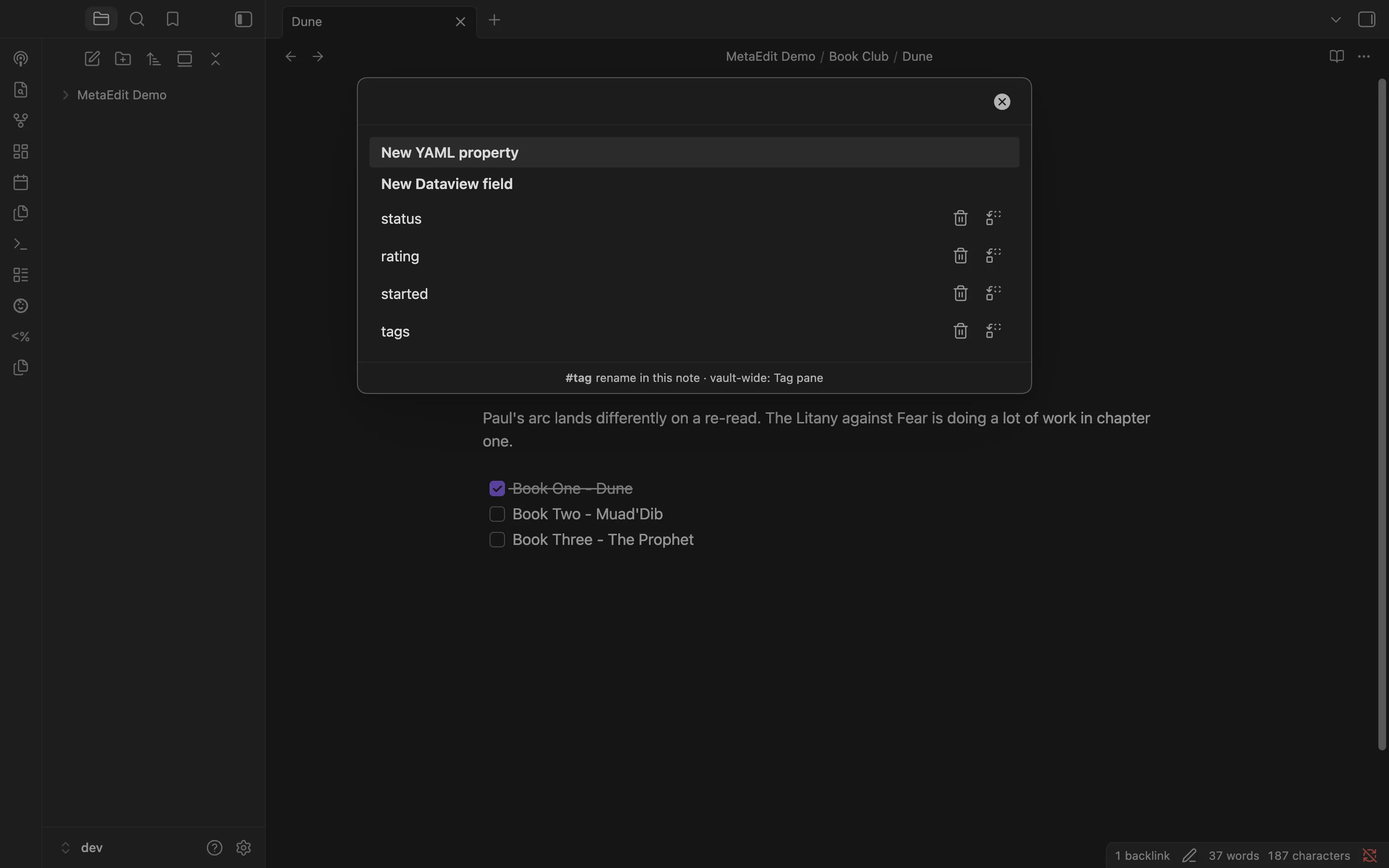
Row order
Section titled “Row order”The picker always lists, in this order:
- Two creation rows, always present: “New YAML property” and “New Dataview field”. See create properties.
- Body tags, one row per occurrence.
- YAML frontmatter properties: top-level keys first, then nested dot-path rows.
- Inline Dataview fields.
Type to fuzzy-filter, use the arrow keys, and press Enter to pick a row. The footer reminds you of the tag handoff: ‘#tag - rename in this note · vault-wide: Tag pane’.
Body tags: one row per occurrence
Section titled “Body tags: one row per occurrence”Every occurrence of a body tag gets its own row, because each row edits that exact spot in the text. When the same tag appears more than once, the rows are disambiguated with the line number and an occurrence ordinal, like #book-club (line 16, 1/2) and #book-club (line 21, 2/2). The line is omitted if it is unknown. #book-club and #book-club/june are different tags, so they never share a counter.
Tag rows come from Obsidian’s metadata cache, so tags inside code blocks never appear. Tag rows carry no Delete or Transform buttons, and renaming is scoped to this note only - for a vault-wide rename, use Obsidian’s Tag pane. See edit tags.
Nested YAML: virtual dot-path rows
Section titled “Nested YAML: virtual dot-path rows”Top-level frontmatter keys map one-to-one to rows. Nested values are handled differently:
- Every nested scalar (a string, number, boolean, date, or null under a nested key) is surfaced as its own virtual row, named by its dot path:
publish.date,sources[0].name. List positions use bracket indexes. - Parent containers are hidden. A key whose value is an object, or a list containing objects or lists, gets no row of its own, because it cannot be edited as one value. Its scalar leaves are what you edit.
- A plain list of scalars (like
genresbelow) stays a single row and opens Obsidian’s native list widget - see lists and multi-values. Its elements do not get individual rows. - A plain list nested inside another key (like
publish.platformsbelow) produces no rows at all: its elements are addressed by index, and only the developer API can write those paths.
Nested rows can be edited but not deleted or transformed as a unit, so they show no row action buttons. Top-level rows get the “Delete property” and “Transform to YAML ⇄ Dataview” buttons - see delete and transform.
Inline field recognition rules
Section titled “Inline field recognition rules”MetaEdit recognizes inline fields the way Dataview does. The rules worth knowing:
- A full-line field is
key:: value, where the field takes the whole line. - Bracketed fields,
[key:: value]and(key:: value), can sit mid-sentence, and several can share one line. - On any given line, bracketed fields win: if a line contains bracketed fields, its full-line reading is ignored. A line yields one or the other, never both.
- Leading blockquote markers and one list marker are stripped from full-line keys:
> - due:: tomorrowyields the keydue. - Fields inside the frontmatter block or inside fenced code blocks (
```or~~~) are examples, not metadata, and never become rows. - Wikilinks without
::are never misread:[[A Wikilink]]yields nothing. But a wikilink whose text contains::is different:[[my-key:: value]]is parsed as the bracketed fieldmy-key, starting at the inner bracket. Such a link shows up as a picker row, and editing it rewrites the text inside the link. - A bracketed value ending in a backslash keeps its closing bracket:
[path:: C:\notes\]parses with the valueC:\notes\. Backslash is not an escape character. - If the same field name appears several times, each occurrence is listed, and editing the field updates every instance in the note.
Worked example
Section titled “Worked example”---title: Dunerating: 8genres: - sci-fi - classicspublish: date: 2026-07-01 platforms: - blogsources: - name: Kindle page: 104---
Discussed with the #book-club crowd.
status:: readingReturn the borrowed copy soon (due:: 2026-07-15).
Next #book-club meeting: bring chapter notes.That note produces these rows, after the two creation rows:
| Picker row | Comes from | Notes |
|---|---|---|
#book-club (line 16, 1/2) |
The body tag on line 16 | Edits this occurrence only |
#book-club (line 21, 2/2) |
The body tag on line 21 | Edits this occurrence only |
title |
Top-level YAML key | Native text widget |
rating |
Top-level YAML key | Native number widget |
genres |
Top-level YAML list of scalars | Native list widget (chips) |
publish.date |
Nested scalar under publish |
Virtual dot-path row |
sources[0].name |
Scalar inside a list of objects | Virtual dot-path row |
sources[0].page |
Scalar inside a list of objects | Virtual dot-path row |
status |
Full-line inline field | Value rewritten in place |
due |
Bracketed inline field | Brackets and sentence stay intact |
Not listed: publish and sources (parent containers), the individual genres elements (the list is one row), and publish.platforms (a nested plain list, reachable only through the API).
What never appears
Section titled “What never appears”- Non-markdown files. “MetaEdit: Run” silently does nothing when the active file is not a markdown note (a PDF or canvas, for example); the only trace is a developer-console message.
- Anything inside code fences, whether it looks like a field or a tag.
- Parent YAML containers as a single editable value, as described above.
- Rows hidden by settings. The “Edit Meta menu” settings can hide named properties and body tags from the picker. Filtering only hides rows - it never deletes data, turning the feature off means nothing is filtered, and hidden-but-present keys are still excluded from new-property name suggestions. Matching is exact and case-sensitive, and hiding body tags never affects the frontmatter
tagsproperty. See the settings reference.