
Kanban Board Helper: sync lanes to note properties
Move a card between lanes on a Kanban board and the linked note’s property updates to match. Drag [[Dune review]] from “Drafting” to “Published”, and about 5 seconds later the note’s status property reads Published - no manual editing.
For a full worked setup, see the Kanban status sync recipe.
Set it up
Section titled “Set it up”- Open Settings and go to the MetaEdit tab.
- Turn on the “Kanban Board Helper” toggle. It takes effect immediately.
- Click the row’s gear button to expand the configuration.
- In the text input at the bottom, type or pick a board. The autocomplete suggests every note with a
kanban-pluginfrontmatter key, filtering as you type. Click “Add”. - In the new table row, type the property key to sync into the “Property in link” field (for example
status). The read-only “Possible values” column previews the board’s current lane headings.
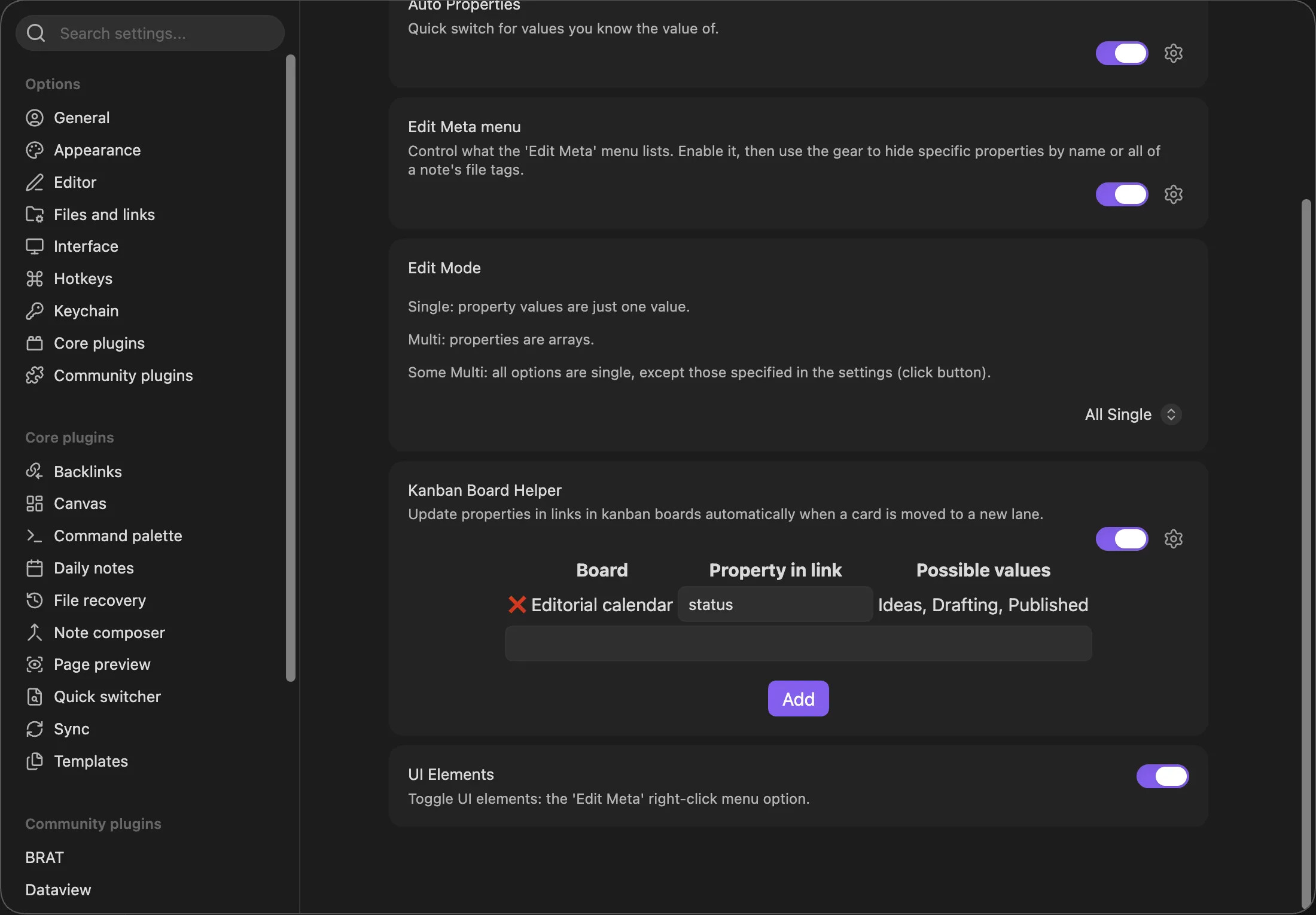
Changes save immediately. From now on, moving a card writes the new lane’s heading text into the configured property of the note the card links to.
How it decides what to write
Section titled “How it decides what to write”A Kanban card is a top-level task line whose content starts with a link:
---kanban-plugin: board---
## Ideas
- [ ] [[Post about tags]]
## Drafting
- [ ] [[Dune review]] @[[2026-07-15]]
## Published
The helper follows these rules:
- Only the leading link counts. In
- [ ] [[Dune review]] @[[2026-07-15]], only[[Dune review]]identifies the card’s note. Trailing links on the same line (Kanban date links,see [[ref]]references) and indented sub-checklist items are ignored. - The lane is the nearest heading above the card. Moving the card under “## Published” writes
Published. - Cards above the first heading are skipped. They have no lane to write.
- Ambiguous links are skipped, not guessed. If a bare link like
[[Dune review]]could refer to several notes with the same basename and Obsidian’s link resolution cannot settle it, the helper bails for that card rather than write to the wrong note. - Writes only happen when the value actually differs. Re-saving a board without moving cards is a no-op.
The write itself uses MetaEdit’s normal property update, so it works whether the note stores the property in YAML frontmatter or as an inline Dataview field - see write safety.
When it runs
Section titled “When it runs”The helper shares its trigger pipeline with Progress Properties: modify event only, markdown files with YAML frontmatter, Excalidraw skipped, unchanged content skipped, and a 5-second debounce that resets while you keep editing. The full list is in how and when updates run.
If the property is missing
Section titled “If the property is missing”When a card’s note lacks the configured property, MetaEdit shows a notice for that card:
MetaEdit: (ERROR) 'status' not found in "Dune review" (Kanban board 'Editorial calendar').This is a warning - nothing is broken - but it appears with the MetaEdit: (ERROR) prefix anyway; that is a known quirk of how MetaEdit surfaces warnings. Fix it by adding the property to the note. See the notices reference for every message MetaEdit can show.
Caveats
Section titled “Caveats”- Renaming a board file breaks its row. Boards are matched by file basename, and the stored name is not updated on rename. Remove the stale row and re-add the board under its new name. A row whose board file no longer exists shows “FILE NOT FOUND” in its “Possible values” column.
- The board list is computed when the settings tab renders. A board created while the tab is open will not appear in the suggestions until you reopen the tab.
- Per-card failures never abort the board. One unresolvable link or a linked note with malformed YAML is logged to the developer console, and the rest of the cards still sync.
- Property names match exactly and case-sensitively, like everywhere else in MetaEdit.
For the full settings tour, see the settings reference.