
Track daily metrics with Tracker tags
The obsidian-tracker plugin can chart numbers embedded in your notes as #tag:value tokens, such as #weight:80.5. MetaEdit gives you a fast way to write and update those tokens: pick the tag in the property picker, choose “Tracker value (#tag:value)”, type the number. Re-editing replaces the old value instead of stacking, so a daily log stays clean.
What you need
Section titled “What you need”- MetaEdit 1.9.0 on Obsidian 1.12.7 or newer (desktop or mobile).
- The community obsidian-tracker plugin, installed and enabled.
The “Tracker value (#tag:value)” action only exists when Tracker is installed. MetaEdit checks for it once, when the plugin loads - if you install Tracker mid-session, disable and re-enable MetaEdit (or restart Obsidian) so the action appears.
Step 1: seed your daily notes with bare tags
Section titled “Step 1: seed your daily notes with bare tags”Put the tags you want to track into your daily note template, so every day starts with them ready to fill in:
# {{date}}
#weight #mood
## Log
This works with the core Daily notes template or Templater. If you use Templater for richer metadata capture, see prompt for metadata in Templater templates.
Two placement rules: these must be body tags (a frontmatter tags: property never gets a :value suffix), and tags inside code blocks are invisible to MetaEdit because Obsidian’s metadata cache does not index them.
Step 2: log today’s value
Section titled “Step 2: log today’s value”- Open today’s note and run “MetaEdit: Run” from the command palette (or right-click the note and choose “Edit Meta”).
- Pick the
#weightrow. Every tag occurrence gets its own row, so if the same tag appears twice you will see rows like#weight (line 3, 1/2)- pick the occurrence you mean. - An action chooser opens. With Tracker installed, a flat tag like
#weightoffers “Rename tag” and “Tracker value (#tag:value)”. Choose “Tracker value (#tag:value)”.
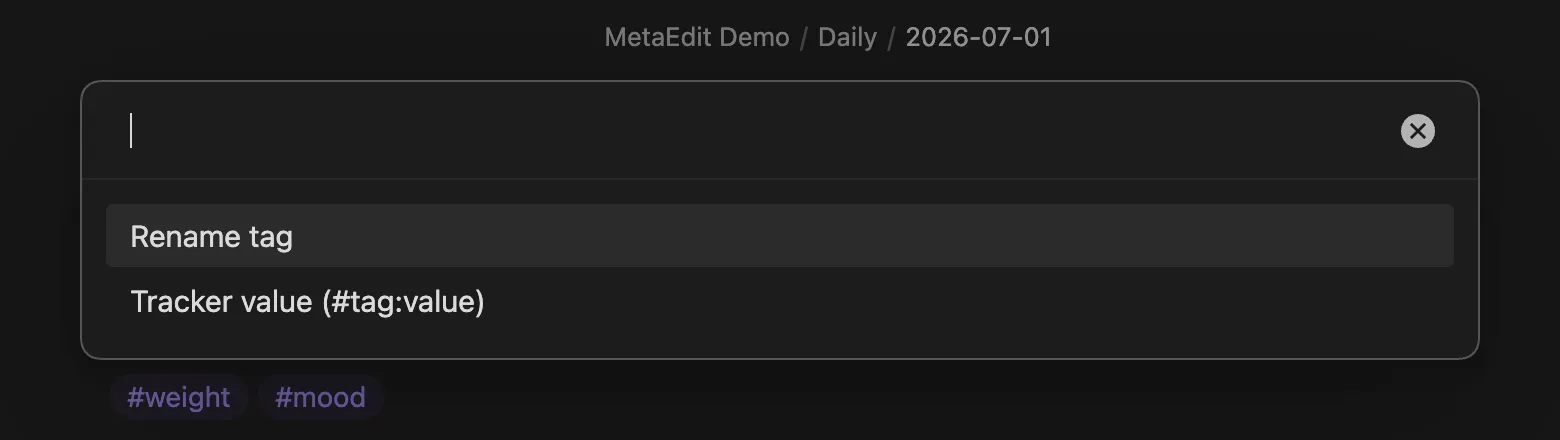
- A prompt titled “Enter a Tracker value for #weight” appears. Type
80.5and press Enter.
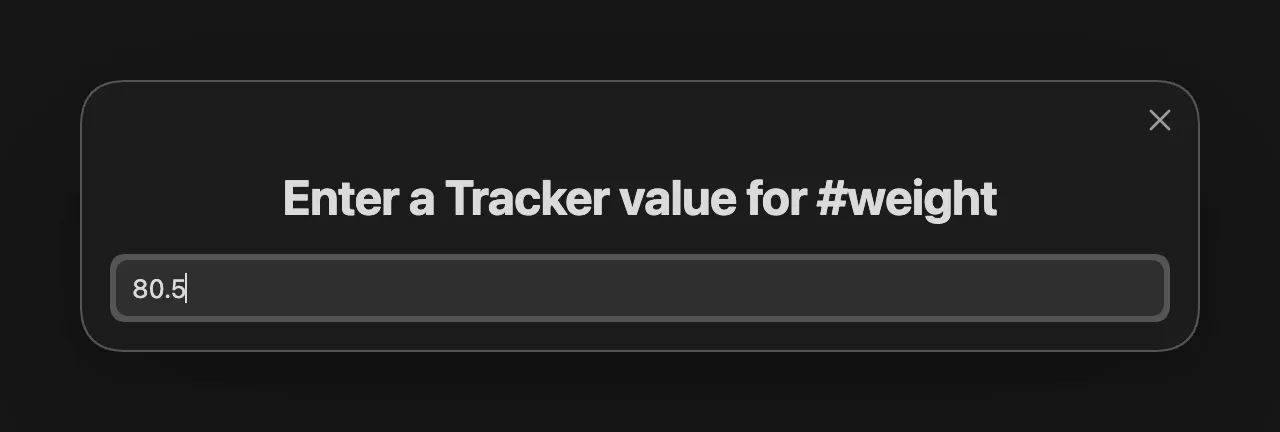
The tag in your note becomes:
#weight:80.5 #moodOnly that exact tag occurrence is rewritten - the rest of the line and the note stay byte-for-byte intact. See how MetaEdit writes to your notes for why that matters.
Nested tags add an “Edit last segment” row to the chooser, and without Tracker a flat tag skips the chooser entirely and goes straight to renaming - the full set of tag actions is covered in edit tags.
Step 3: correct or update a value
Section titled “Step 3: correct or update a value”Weighed in again after coffee? Run the same flow on the #weight row (the :80.5 suffix is Tracker data, not part of the tag, so the row still reads #weight) and enter the new number. MetaEdit replaces the existing suffix rather than appending:
#weight:80.5 -> #weight:81never #weight:81:80.5. The replacement is bounded to the value token itself, so adjacent punctuation survives: editing #weight:80, or (#weight:80) keeps the comma and the parenthesis.
Rules for the value:
- Allowed characters are letters, digits, and
. _ + -. No spaces - a Tracker value is a single token, typically a number. - Submitting an empty value cancels the edit; nothing is written.
- The choice of Tracker mode applies to that one edit only. The next time you edit a tag you pick the action again.
Step 4: chart it
Section titled “Step 4: chart it”Add a Tracker code block to any dashboard note. Tracker’s tag search reads the :value suffix from every #weight:value occurrence:
```trackersearchType: tagsearchTarget: weightfolder: DailystartDate: 2026-06-01endDate: 2026-06-30line: title: Weight yAxisLabel: kg```Adjust folder to wherever your daily notes live. Add a second block for #mood, or track both in one chart with a comma-separated searchTarget - see the Tracker plugin’s documentation for its full query syntax.
Limits worth knowing
Section titled “Limits worth knowing”- Body tags only. Frontmatter tags are ordinary YAML values; MetaEdit never writes Tracker syntax into a
tags:property. - One occurrence per edit. MetaEdit edits the exact tag you picked, in that note. Vault-wide tag operations belong to Obsidian’s Tag pane, as the picker footer says: “#tag - rename in this note · vault-wide: Tag pane”.
- If the note changed under you between opening the picker and confirming (for example, from a sync conflict), MetaEdit refuses the write with an error notice instead of guessing - reopen the picker and try again. The exact messages are listed in notices and error messages.